
:How to Download You tube Video:
If you want to download a you tube video. It is very simple and easy..But how????
There so many way by which you can download youtube video.....
1.Using of YTD:
It is a downloader made only for downloading you tube video. YTD is free software. But it works better when you have YTD pro. But if you upgrade it you have to bye pro version. Now here the trick of using pro version free...
How to Download YTD:
a) Just Go to this site http://www.youtubedownloadersite.com/ .
b) Click on "Free Download"
c) Then Install it.
d) Now copy the URL address of the video which you want to download from the address bar.
e) And Paste it in URL Box of YTD. Click on Download. Enjoy...
Screenshots:

YTD Pro by Patching:
Why Pro ?
- Download multiple videos at the same time
- Built in download acceleration up to 4 times faster
- Download and convert videos with a single action
- Convert multiple files with a single click
How To Patch
- Download and install any version of Basic YTD
- Download YTD Universal Crack and run it
- Click crack button,if it asks browse and select YTD.exe file from installation path
- Done
Run YTD and enjoy PRO features
Patch: Download Patch from Here..


%20Universal%20Crack%20is%20Here%20!&instid%5Bthankyoupage%5D=http%3A%2F%2Fcashandfiles.com%2F)
Download Crack and Set Up ..
Free Make Video Downloader is a free downloader. Using this downloader you can download any web video. Youtube Video, Facebook Video. and many more. It is very useful Software..

How to Download Free Make Video Downloader:
a) Just Go to this site http://www.freemake.com/free_video_downloader/
b) Click on "Download"
c) Then Install and Enjoy it.
d) Now copy the URL address of the video which you want to download from the address bar.
e) And click on Paste URL of Free Make Video Downloader. Enjoy it...
Screenshots:

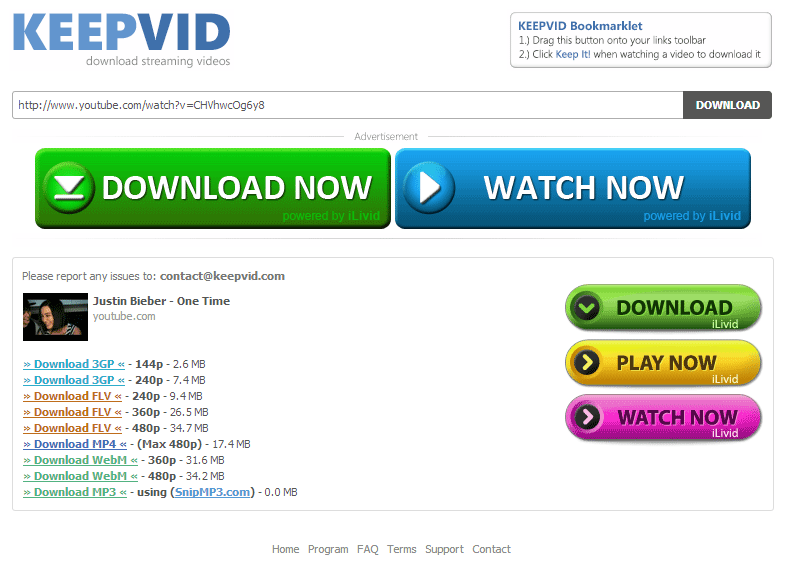
3.Using of Web Video Converter (Keepvid.com):
This is very workable method of downloading You Tube Video. In-fact I also download youtube video by using this method.. What you have to do?
a) Open the site www.keepvid.com.
b) Now copy the URL address of the video which you want to download from the address bar.
c) Paste it in the URL box. and click on Download .
d) Wait. for some time.. A list of version will appear .Choose any one and enjoy.
Note: If you do not have java installed in your machine, it will not work. So Install Java & Enjoy. If you have Internet Download Manager (IDM), you can use it for downloading.
Screenshots:

3.Using of Web Video Converter (Vixy.net):
It is also like Keepvid.com. What you have to do?
3.Using of Web Video Converter (Vixy.net):
It is also like Keepvid.com. What you have to do?
b) Now copy the URL address of the video which you want to download from the address bar.
c) Paste it in the URL box. and click on Download .
d) Wait. for some time.. A list of version will appear .Choose any one and enjoy.
Note: If you do not have java installed in your machine, it will not work. So Install Java & Enjoy. If you have Internet Download Manager (IDM), you can use it for downloading.
Screenshots:


No comments:
Post a Comment